> For the complete documentation index, see [llms.txt](https://www.pranaypourkar.co.in/the-programmers-guide/llms.txt). Markdown versions of documentation pages are available by appending `.md` to page URLs; this page is available as [Markdown](https://www.pranaypourkar.co.in/the-programmers-guide/database/sql-databases/resources-and-references/oreilly-sql-cookbook-2nd-edition/7.-working-with-numbers.md).
# 7. Working with Numbers
## Computing an Average
We want to compute the average value in a column.
1. Computing the average of all employee salaries
```
select avg(sal) as avg_sal from emp
```
2. Compute the average salary for each department
```
select deptno, avg(sal) as avg_sal from emp
group by deptno
```
## Finding the Min/Max Value in a Column
We want to find the highest and lowest values in a given column.
1. Lowest and highest salaries for all employees
```
select min(sal) as min_sal, max(sal) as max_sal from emp
```
2. Lowest and highest salaries for each department
```
select deptno, min(sal) as min_sal, max(sal) as max_sal
from emp group by deptno
```
## Summing the Values in a Column
We want to compute the sum of all values in a column.
1. Sum for all employees
```
select sum(sal) from emp
```
2. Sum for each department
```
select deptno, sum(sal) as total_for_dept
from emp group by deptno
```
## Counting Rows in a Table
We want to count the number of rows in a table, or want to count the number of values in a column.
1. Counting rows for the whole table
```
select count(*) from emp
```
2. Counting rows for each department
```
select deptno, count(*)
from emp group by deptno
```
## Counting Values in a Column
We want to count the number of non-NULL values in a column
```
select count(comm) from emp
```
{% hint style="info" %}
When we do COUNT(\*), counting is rows (regardless of actual value, which is why rows containing NULL and non-NULL values are counted). But when we do COUNT a column, we are counting the number of non-NULL values in that column.
{% endhint %}
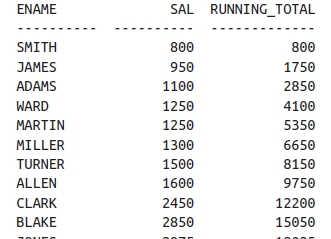
## Generating a Running Total
We want to calculate a running total or cumulative of values in a column
```
select ename, sal,
sum(sal) over (order by sal,empno) as running_total
from emp
order by 2
```
## Generating a Running Product
We want to compute a running product on a numeric column
```
-- Oracle
select empno,ename,sal,
exp(sum(ln(sal))over(order by sal,empno)) as running_prod
from emp
where deptno = 10
```
{% hint style="info" %}
**Steps to Calculate the Product Using `LN` and `EXP`**
1. **Calculate the natural logarithm (`LN`) of each number.**
2. **Sum the logarithms.**
3. **Take the exponential (`EXP`) of the sum to get the product.**
```sql
SELECT EXP(SUM(LN(value))) AS product
FROM (
SELECT 2 AS value FROM DUAL UNION ALL
SELECT 3 AS value FROM DUAL UNION ALL
SELECT 4 AS value FROM DUAL
);
-- Output -> 24
```
{% endhint %}
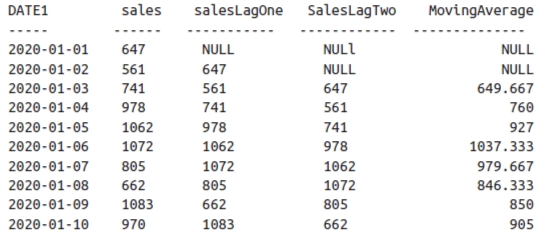
## Smoothing a Series of Values
We have a series of values that appear over time, such as monthly sales figures. We want to implement a simple smoother, such as weighted running average.
A moving average can be calculated by summing the current value and the preceding n-1 values and dividing by n.
```
select date1,
sales,
lag(sales,1) over(order by date1) as salesLagOne,
lag(sales,2) over(order by date1) as salesLagTwo,
(sales
+ (lag(sales,1) over(order by date1))
+ lag(sales,2) over(order by date1))/3 as MovingAverage
from sales
```
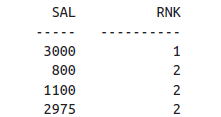
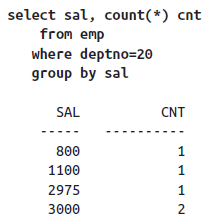
## Calculating a Mode
We want to find the mode.
{% hint style="info" %}
Mode is the element that appears most frequently for a given set of data.
For example,\
select sal from emp where deptno = 20 order by sal;
**SAL**
800\
1100\
2975\
3000\
3000\
\
The mode is 3000.
{% endhint %}
```
select sal,
dense_rank()over(order by cnt desc) as rnk
from (
select sal,count(*) as cnt
from emp
where deptno = 20
group by sal
) x
```
## Calculating a Median
We want to calculate the median.
{% hint style="info" %}
Median is the value of the middle member of a set of ordered elements.
For example,\
select sal from emp where deptno = 20 order by sal
SAL\
800\
1100\
2975\
3000\
3000\
\
The median is 2975.
{% endhint %}
```
-- Oracle (Solution 1)
select median(sal)
from emp
where deptno=20
-- Oracle (Solution 2)
select
percentile_cont(0.5) within group(order by sal)
from emp
where deptno=20
```
## Determining the Percentage of a Total
We want to determine the percentage that values in a specific column represent against a total. For example, we want to determine what percentage of all salaries are the salaries in DEPTNO 10 (the percentage that DEPTNO 10 salaries contribute to the total)
-- Oracle
select distinct (d10/total)*100 as pct
from (
    select deptno,
    sum(sal)over() total,
    sum(sal)over(partition by deptno) d10
    from emp
) x
where deptno=10
## Aggregating Nullable Columns
We want to perform an aggregation on a column, but the column is nullable.
```
select avg(coalesce(comm,0)) as avg_comm
from emp
where deptno=30
```
## Computing Averages Without High and Low Values
We want to compute an average, but excluding the highest and lowest values
```
-- Oracle
select avg(sal)
from (
select sal,
min(sal)over() min_sal,
max(sal)over() max_sal
from emp
) x
where sal not in (min_sal,max_sal)
```
## Converting Alphanumeric Strings into Numbers
We have alphanumeric data and would like to return numbers only. You want to return the number 123321 from the string “pjenil123g321.”
-- Oracle
select cast(
    replace(
        translate( 'paul123f321','abcdefghijklmnopqrstuvwxyz', rpad('#',26,'#')),'#','') as integer ) as num
from dual;
## Changing Values in a Running Total
We want to modify the values in a running total depending on the values in another column.
```
SELECT
CASE
WHEN trx = 'PY' THEN
'PAYMENT'
ELSE
'PURCHASE'
END trx_type,
amt,
SUM(
CASE
WHEN trx = 'PY' THEN
- amt
ELSE
amt
END
)
OVER(
ORDER BY
id, amt
) AS balance
FROM
v
```
---
# Agent Instructions
This documentation is published with GitBook. GitBook is the documentation platform designed so that both humans and AI agents can read, navigate, and reason over technical content effectively. Learn more at gitbook.com.
## Querying This Documentation
If you need additional information that is not directly available in this page, you can query the documentation by asking a question.
Perform an HTTP GET request on the following URL with the `ask` and `goal` query parameters:
```
GET https://www.pranaypourkar.co.in/the-programmers-guide/database/sql-databases/resources-and-references/oreilly-sql-cookbook-2nd-edition/7.-working-with-numbers.md?ask=&goal=
```
`ask` is the immediate question: it should be specific, self-contained, and written in natural language.
`goal` is what the user is ultimately trying to achieve, the reason they need the answer. Sharing it helps GitBook give you a better, more relevant answer. A goal is most helpful when it describes the outcome the user wants rather than restating the question. For example, with `ask=how do I create an API token`, a goal like `automate deployments from our CI pipeline` lets GitBook tailor the answer to that use case.
The response will contain a direct answer to the question and relevant excerpts and sources from the documentation.
Use this mechanism when the answer is not explicitly present in the current page, you need clarification or additional context, or you want to retrieve related documentation sections.