> For the complete documentation index, see [llms.txt](https://www.pranaypourkar.co.in/the-programmers-guide/llms.txt). Markdown versions of documentation pages are available by appending `.md` to page URLs; this page is available as [Markdown](https://www.pranaypourkar.co.in/the-programmers-guide/java/java-basics/java-data-types/specialized-classes/date-and-time.md).
# Date and Time
Overview of various classes and libraries available for working with dates, times, and timestamps in Java.
## `java.util.Date`
**Description:** It is used to represent a specific point in time, including both date and time information. It has been around since the early days of Java, but it has limitations and potential issues.
**Limitations:**
* **Thread-unsafe:** Accessing or modifying a `Date` object from multiple threads concurrently can lead to unexpected behavior due to its mutable nature.
* **Limited date and time manipulation:** Working with specific date or time components can be cumbersome and error-prone.
* **Timezone issues:** `Date` objects represent time in UTC by default, and handling timezones can be complex and error-prone.
* **Deprecated methods:** Many methods of `Date` are deprecated in favor of the newer and more robust `java.time` API introduced in Java 8.
**Potential Use case**: In legacy java codebase but cautious of its limitations and consider migrating to the `java.time` API when feasible.
{% hint style="info" %}
For new development, it is recommended to use the `java.time` API. It offers classes like `LocalDate`, `LocalTime`, and `LocalDateTime` for more specific and thread-safe date and time handling.
{% endhint %}
**Example:**
```java
package org.example;
import lombok.extern.slf4j.Slf4j;
import java.util.Date;
@Slf4j
public class Application {
public static void main(String[] args) {
Date date = new Date();
log.info("Current Date and Time: {}", date);
// timestamp (milliseconds since January 1, 1970, 00:00:00 GMT)
log.info("Current Time in timestamp: {}", date.getTime());
Date specificDate = new Date(124, 0, 1); // Year 2024, Month 0 (January), Day 1
log.info("Specific Date and Time: {}", specificDate);
// Compare the two dates
int comparison = date.compareTo(specificDate);
// Print the result of comparison
if (comparison < 0) {
log.info("Current date is before specificDate");
} else if (comparison > 0) {
log.info("Current date is after specificDate");
} else {
log.info("Current date is equal to specificDate");
}
}
}
```
Output
## `java.util.Calendar`
**Description:** It is an abstract class that provides functionalities for working with dates and times. Since it is abstract, it cannot be directly created as a `Calendar` object using a constructor. Instead, use the static method `Calendar.getInstance()` to get an instance based on the current time, default locale, and time zone. It is mutable and able to modify the date and time represented by a `Calendar` object by setting its field values.
**Limitations:**
* **Complexity:** Working with specific date or time components using `Calendar` can be cumbersome and involve multiple method calls.
* **Timezone handling:** While `Calendar` supports timezones, it can be complex to manage them effectively, especially in multi-threaded environments.
* **Thread-unsafe:** Similar to `Date`, accessing or modifying a `Calendar` object from multiple threads concurrently can lead to issues. It's recommended to use thread-safe alternatives when necessary.
**Potential Use case**: In legacy java codebase.
{% hint style="info" %}
Similar to `Date`, `java.util.Calendar` is considered a legacy class. For new development in Java 8 and above, it is recommended to use the `java.time` API. It offers more intuitive, thread-safe, and timezone-aware classes for date and time handling.
{% endhint %}
**Example:**
```java
package org.example;
import lombok.extern.slf4j.Slf4j;
import java.util.Calendar;
import java.util.GregorianCalendar;
@Slf4j
public class Application {
public static void main(String[] args) {
Calendar calendar = Calendar.getInstance();
// Get current date and time
log.info("Current date and time: " + calendar.getTime());
// Get specific calendar fields
log.info("Year: {}", calendar.get(Calendar.YEAR));
log.info("Month: {}", calendar.get(Calendar.MONTH) + 1); // Month is 0-based
log.info("Day: {}", calendar.get(Calendar.DAY_OF_MONTH));
// Add or subtract time
calendar.add(Calendar.DAY_OF_MONTH, 5); // Add 5 days
log.info("Date after adding 5 days: {}", calendar.getTime());
// Check for leap year
int year = 2024;
// GregorianCalendar class is a concrete subclass of Calendar
GregorianCalendar gregorianCalendar = new GregorianCalendar();
if (gregorianCalendar.isLeapYear(year)) {
log.info("{} is a leap year.", year);
} else {
log.info("{} is not a leap year.", year);
}
}
}
```
Output
## java.sql.Timestamp
In Java, `java.sql.Timestamp` is a class that represents a timestamp with nanosecond precision, specifically designed for use with JDBC (Java Database Connectivity). It essentially acts as a wrapper around the `java.util.Date` class, providing additional functionality for handling timestamps in a database context. It stores a timestamp value as milliseconds since the epoch (January 1, 1970, 00:00:00 UTC) with nanosecond precision.
**Benefits:**
* Enables storing timestamps with high precision in JDBC applications.
* Ensures consistent handling of timestamps across different databases.
* Provides convenience methods for working with timestamp data.
> **Comparison with `java.time.LocalDateTime`:**
>
> * Both represent date and time information.
> * `java.time.LocalDateTime` is part of the newer `java.time` API and doesn't have direct JDBC integration.
> * `java.sql.Timestamp` is specifically designed for JDBC interaction, but its precision is limited to nanoseconds (unlike `java.time.LocalDateTime` which doesn't have inherent limitations).
>
> While `java.sql.Timestamp` is convenient for JDBC interactions, consider using the `java.time` API classes like `LocalDateTime` for in-memory date and time manipulations within your application for potentially better flexibility and features. We can convert these objects to `Timestamp` when necessary for database interactions.
**Example:**
```java
// Using current time in milliseconds
long currentTimeMillis = System.currentTimeMillis();
Timestamp timestamp1 = new Timestamp(currentTimeMillis);
log.info("Timestamp1: {}", timestamp1);
// Output - Timestamp1: 2024-03-10 07:18:29.97
// Using Instant object (requires conversion)
Instant instant = Instant.now();
Timestamp timestamp2 = Timestamp.from(instant);
log.info("Timestamp2: {}", timestamp2);
// Output - Timestamp2: 2024-03-10 07:18:29.9801169
// Extract components from a Timestamp
log.info("Get Nano: {}", timestamp2.getNanos()); // Get Nano: 980116900
log.info("Get Time: {}", timestamp2.getTime()); // Get Time: 1710035309980
// Convert Timestamp to other representations
Timestamp timestamp = new Timestamp(1678333200000L);
// Convert to String with a specific format
SimpleDateFormat formatter = new SimpleDateFormat("yyyy-MM-dd HH:mm:ss.SSS");
String formattedString = formatter.format(timestamp);
log.info("Formatted string: {}", formattedString);
// Output - Formatted string: 2023-03-09 09:10:00.000
```
## `java.time` (Java 8 and later)
**Description:** The `java.time` API, introduced in Java 8, provides a modern and improved set of classes for working with dates, times, and timezones. It addresses the limitations and complexities of the older `java.util.Date` and `java.util.Calendar` classes, offering improved design, thread-safety, and timezone handling.
It includes:
* **Immutable classes:** Objects representing dates, times, and durations are immutable, meaning their state cannot be changed after creation. This ensures thread-safety and simplifies reasoning about your code.
* **Timezone support:** The API provides built-in support for handling timezones through the `ZoneId` class and related functionalities.
* **Wide range of classes:** It offers various classes for different date and time representations, including `LocalDate`, `LocalTime`, `LocalDateTime`, `Instant`, `Duration`, etc. catering to different use cases.
**Potential Use case**:
* **Date and time calculations:** Perform calculations like adding or subtracting days, weeks, months, etc., from a specific date or time.
* **Date and time formatting:** Format dates and times according to different locales and patterns.
* **Parsing date and time strings:** Convert strings representing dates and times into corresponding `java.time` objects.
* **Time zone handling:** Manage time zones effectively, considering different time zone offsets and rules.
**Classes:**
### **java.time.****LocalDate**
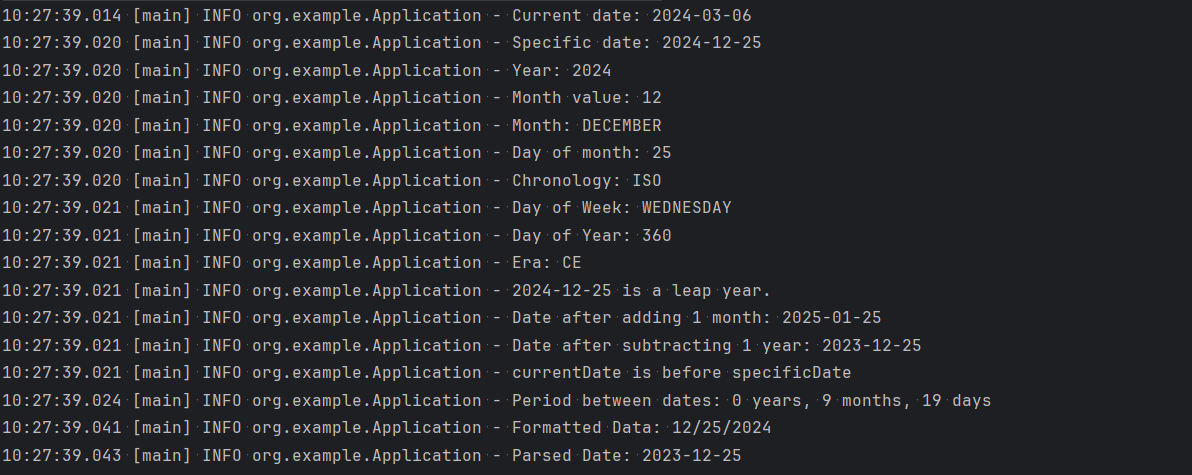
The `LocalDate` class in the `java.time` API represents a date without time and timezone information. It's an immutable class, meaning its state cannot be changed after creation. It represents a date in the ISO-8601 calendar system.
> **Thread-safe:** Unlike `java.util.Date`, `LocalDate` is thread-safe, making it suitable for concurrent programming.
>
> **Immutable:** Its immutability simplifies reasoning about your code and avoids accidental modifications.
**Example:**
```java
package org.example;
import lombok.extern.slf4j.Slf4j;
import java.time.LocalDate;
import java.time.Period;
import java.time.format.DateTimeFormatter;
import java.util.Locale;
@Slf4j
public class Application {
public static void main(String[] args) {
// Get current date
LocalDate currentDate = LocalDate.now();
log.info("Current date: {}", currentDate);
// Create a specific date
LocalDate specificDate = LocalDate.of(2024, 12, 25);
log.info("Specific date: {}", specificDate);
// Get specific components of the date
log.info("Year: {}", specificDate.getYear());
log.info("Month value: {}", specificDate.getMonthValue());
log.info("Month: {}", specificDate.getMonth().toString());
log.info("Day of month: {}", specificDate.getDayOfMonth());
log.info("Chronology: {}", specificDate.getChronology());
log.info("Day of Week: {}", specificDate.getDayOfWeek());
log.info("Day of Year: {}", specificDate.getDayOfYear());
log.info("Era: {}", specificDate.getEra());
// Check if a year is a leap year
if (specificDate.isLeapYear()) {
log.info("{} is a leap year.", specificDate);
} else {
log.info("{} is not a leap year.", specificDate);
}
// Add or subtract days, months, or years
log.info("Date after adding 1 month: {}", specificDate.plusMonths(1));
log.info("Date after subtracting 1 year: {}", specificDate.minusYears(1));
// Compare dates
if (currentDate.isBefore(specificDate)) {
log.info("currentDate is before specificDate");
} else if (currentDate.isEqual(specificDate)) {
log.info("currentDate is equal specificDate");
} else {
log.info("currentDate is after specificDate");
}
// Calculate the period between two dates
Period period = Period.between(currentDate, specificDate);
log.info("Period between dates: {} years, {} months, {} days", period.getYears(), period.getMonths(), period.getDays());
// Format dates to different locales
DateTimeFormatter formatter = DateTimeFormatter.ofPattern("MM/dd/yyyy", Locale.ENGLISH);
String formattedDate = specificDate.format(formatter);
log.info("Formatted Data: {}", formattedDate);
// Parse dates from strings
String dateString = "2023-12-25";
DateTimeFormatter isoFormatter = DateTimeFormatter.ISO_LOCAL_DATE;
LocalDate parsedDate = LocalDate.parse(dateString, isoFormatter);
log.info("Parsed Date: {}", parsedDate);
}
}
```
### **java.time.****LocalTime**
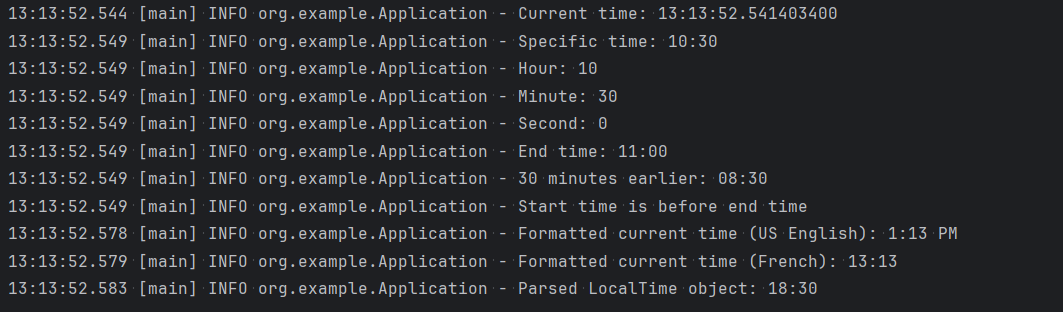
The `LocalTime` class in the `java.time` API represents a time without a date or timezone information. It's an immutable class, meaning its state cannot be changed after creation. It represents a time in the 24-hour format (e.g., 10:15:30).
> **Thread-safe:** Unlike `java.util.Date`, `LocalTime` is thread-safe, making it suitable for concurrent programming.
>
> **Immutable:** Its immutability simplifies reasoning about your code and avoids accidental modifications.
**Example:**
```java
package org.example;
import java.time.LocalTime;
import java.time.format.DateTimeFormatter;
import java.util.Locale;
import lombok.extern.slf4j.Slf4j;
@Slf4j
public class Application {
public static void main(String[] args) {
// Get the current time
LocalTime now = LocalTime.now();
log.info("Current time: {}", now);
// Create a specific time
LocalTime specificTime = LocalTime.of(10, 30, 0); // 10:30 AM
log.info("Specific time: {}", specificTime);
// Get specific components of the time
log.info("Hour: {}", specificTime.getHour());
log.info("Minute: {}", specificTime.getMinute());
log.info("Second: {}", specificTime.getSecond());
// Add or subtract hours, minutes, or seconds
LocalTime startTime = LocalTime.of(9, 0);
LocalTime endTime = startTime.plusHours(2); // Add 2 hours
LocalTime earlierTime = startTime.minusMinutes(30); // Subtract 30 minutes
log.info("End time: {}", endTime);
log.info("30 minutes earlier: {}", earlierTime);
// Compare times
if (startTime.isBefore(endTime)) {
log.info("Start time is before end time");
} else {
log.info("Start time is after end time");
}
// Format times to different locales (eg US, FR)
// Format in US English locale (12-hour format with AM/PM)
DateTimeFormatter usFormatter = DateTimeFormatter.ofPattern("h:mm a", Locale.US);
String formattedTimeUS = now.format(usFormatter);
log.info("Formatted current time (US English): {}", formattedTimeUS);
// Format in French locale (24-hour format)
DateTimeFormatter frenchFormatter = DateTimeFormatter.ofPattern("HH:mm", Locale.FRANCE);
String formattedTimeFR = now.format(frenchFormatter);
log.info("Formatted current time (French): {}", formattedTimeFR);
// Parse times from strings
String timeString = "18:30:00";
DateTimeFormatter formatter = DateTimeFormatter.ISO_LOCAL_TIME;
LocalTime parsedTime = LocalTime.parse(timeString, formatter);
log.info("Parsed LocalTime object: {}", parsedTime);
}
}
```
Output
### **java.time.****LocalDateTime**
The `java.time.LocalDateTime` class in Java combines the functionalities of `LocalDate` and `LocalTime` classes, representing both date and time information without timezone data. It's also an immutable class, ensuring thread-safety and simplifying reasoning about your code. Represents a date and time without timezone information (e.g., 2024-03-07T21:51:24)
**Example:**
```java
package org.example;
import java.time.Duration;
import java.time.LocalDate;
import java.time.LocalDateTime;
import java.time.LocalTime;
import java.time.format.DateTimeFormatter;
import java.util.Locale;
import lombok.extern.slf4j.Slf4j;
@Slf4j
public class Application {
public static void main(String[] args) {
// Get the current date and time
LocalDateTime now = LocalDateTime.now();
log.info("Current date and time: {}", now);
// Create a specific date and time
LocalDateTime specificDatetime = LocalDateTime.of(2024, 12, 15, 10, 30);
log.info("Specific date and time: {}", specificDatetime);
// Combine a date with a specific time
LocalDate date = LocalDate.of(2023, 12, 25);
LocalTime time = LocalTime.of(12, 0);
LocalDateTime datetime = LocalDateTime.of(date, time);
log.info("Combined Datetime: {}", datetime);
// Compare LocalDateTime objects
if(now.isBefore(specificDatetime)) {
log.info("Current datetime is before specific datetime");
} else {
log.info("Current datetime is after specific datetime");
}
// Calculate the duration between two LocalDateTime objects
Duration duration = Duration.between(now, specificDatetime);
log.info("Duration: {}", duration);
// Format LocalDateTime objects to different formats
DateTimeFormatter isoFormatter = DateTimeFormatter.ISO_LOCAL_DATE_TIME;
String isoFormattedDateTime = now.format(isoFormatter);
log.info("Formatted date and time (ISO): {}", isoFormattedDateTime);
DateTimeFormatter customFormatter = DateTimeFormatter.ofPattern("dd-MM-yyyy hh:mm a");
String customFormattedDateTime = now.format(customFormatter);
log.info("Formatted date and time (custom): {}", customFormattedDateTime);
// Parsing from a string
String dateTimeString = "27-03-2024 11:30:13.998 pm";
DateTimeFormatter formatter = DateTimeFormatter.ofPattern("dd-MM-yyyy hh:mm:ss.SSS a");
LocalDateTime parsedDateTime = LocalDateTime.parse(dateTimeString, formatter);
log.info("Parsed LocalDateTime object: {}", parsedDateTime);
}
}
```
Output
{% hint style="info" %}
**Supported patterns in `DateTimeFormatter.ofPattern(...)`:**
* **d:** Day of the month, as a decimal number (1-31)
* **M:** Month of the year, as a decimal number (1-12)
* **y:** Year without a century, as a decimal number (00-99)
* **yyyy:** Year with century, as a decimal number (e.g., 2024)
* **HH:** Hour in 24-hour format (00-23)
* **h:** Hour in 12-hour format (1-12)
* **m:** Minutes, as a zero-padded decimal number (00-59)
* **a:** Meridian indicator (am or pm)
* **dd:** Represents the day of the month with two digits (01-31)
* **MM:** Represents the month as a number with two digits (01-12)
* **mm:** Represents the minutes with two digits (00-59)
* **ss:** Represents the seconds with two digits (00-59)
* **S:** Represent fractional seconds of a time value
Refer to the Java documentation for more details -
{% endhint %}
```java
String[] patterns = {
"yyyy-MM-dd HH:mm:ss",
"yyyy-MM-dd HH:mm:ss.S",
"yyyy-MM-dd HH:mm:ss.SS",
"yyyy-MM-dd HH:mm:ss.SSS",
"yyyy-MM-dd HH:mm:ss.SSSS",
"yyyy-MM-dd HH:mm:ss.SSSSSSSSS"
};
// Get the current date and time
LocalDateTime now = LocalDateTime.now();
for (String pattern : patterns) {
DateTimeFormatter formatter = DateTimeFormatter.ofPattern(pattern);
log.info("Current date and time: {}", now.format(formatter));
}
```
### **java.time.****ZonedDateTime**
`ZonedDateTime` is a class introduced in Java 8 that represents a date and time with a time zone offset. It combines the functionalities of `LocalDateTime` (date and time without zone) and `ZoneId` (identifier for a time zone). Unlike `LocalDateTime`, `ZonedDateTime` is aware of the time zone context, making it useful for scenarios where time zone information is crucial. It stores date, time, and time zone information in a single object.
**Example:**
```java
package org.example;
import lombok.extern.slf4j.Slf4j;
import java.time.ZoneId;
import java.time.ZoneOffset;
import java.time.ZonedDateTime;
@Slf4j
public class Application {
public static void main(String[] args) {
// Creating ZonedDateTime from current system time (India)
ZonedDateTime currentDateTime = ZonedDateTime.now();
log.info("Current Date and Time in India: {}", currentDateTime);
// Creating ZonedDateTime with a specific time zone
ZonedDateTime dateTimeInNewYork = ZonedDateTime.now(ZoneId.of("America/New_York"));
log.info("Date and Time in New York: {}", dateTimeInNewYork);
// Creating ZonedDateTime with a UTC time zone
ZonedDateTime dateTimeInUTC = ZonedDateTime.now(ZoneOffset.UTC);
log.info("Date and Time in UTC: {}", dateTimeInUTC);
}
}
```
Output
{% hint style="info" %}
"T" serves as a separator between the date and time components according to the ISO 8601 standard format for representing date and time.
{% endhint %}
```java
// Creating ZonedDateTime from current system time (India)
ZonedDateTime currentDateTime = ZonedDateTime.now();
log.info("Current Date and Time in India: {}", currentDateTime);
// Output - Current Date and Time in India: 2024-03-09T16:24:33.547711600+05:30[Asia/Calcutta]
// Converting ZonedDateTime object to a different time zone "Europe/Paris"
ZonedDateTime dateTimeInParis = currentDateTime.withZoneSameInstant(ZoneId.of("Europe/Paris"));
log.info("Current Date and Time in Paris: {}", dateTimeInParis);
// Output - Current Date and Time in Paris: 2024-03-09T11:54:33.547711600+01:00[Europe/Paris]
// Parsing a string to a ZonedDateTime
String dateTimeString1 = "2024-03-07T12:30:00+05:30";
ZonedDateTime parsedDateTime1 = ZonedDateTime.parse(dateTimeString1, DateTimeFormatter.ISO_OFFSET_DATE_TIME);
log.info("Parsing given string {} to ZoneDateTime {}",dateTimeString1, parsedDateTime1);
// Output - Parsing given string 2024-03-07T12:30:00+05:30 to ZoneDateTime 2024-03-07T12:30+05:30
String dateTimeString2 = "2024-03-07T12:30:00.123+02:30";
ZonedDateTime parsedDateTime2 = ZonedDateTime.parse(dateTimeString2);
log.info("Parsing given string {} to ZoneDateTime {}",dateTimeString2, parsedDateTime2);
// Output - Parsing given string 2024-03-07T12:30:00.123+02:30 to ZoneDateTime 2024-03-07T12:30:00.123+02:30
// Adding or subtracting time from a ZonedDateTime object
ZonedDateTime futureDateTime = currentDateTime.plusHours(3).plusMinutes(30);
log.info("Future Date and Time: {}", futureDateTime);
// Output - Future Date and Time: 2024-03-09T19:54:33.547711600+05:30[Asia/Calcutta]
ZonedDateTime pastDateTime = currentDateTime.minusDays(1);
log.info("Past Date and Time: {}", pastDateTime);
// Output - Past Date and Time: 2024-03-08T16:24:33.547711600+05:30[Asia/Calcutta]
ZonedDateTime pastCenturyDateTime = currentDateTime.minus(1, ChronoUnit.CENTURIES);
log.info("Past Century Date and Time: {}", pastCenturyDateTime);
// Output - Past Century Date and Time: 1924-03-09T16:24:33.547711600+05:30[Asia/Calcutta]
// Comparing two ZonedDateTime objects
if (futureDateTime.isBefore(currentDateTime)) {
log.info("{} is before {}", futureDateTime, currentDateTime);
} else if (futureDateTime.isAfter(currentDateTime)) {
log.info("{} is after {}", futureDateTime, currentDateTime);
} else {
log.info("{} is equal to {}", futureDateTime, currentDateTime);
}
// Output - 2024-03-09T19:54:33.547711600+05:30[Asia/Calcutta] is after 2024-03-09T16:24:33.547711600+05:30[Asia/Calcutta]
log.info("Year: {}", currentDateTime.getYear()); // Year: 2024
log.info("Month: {}", currentDateTime.getMonth()); // Month: MARCH
log.info("Zone: {}", currentDateTime.getZone()); // Zone: Asia/Calcutta
// Convert ZonedDateTime to other representations
// Convert to Instant (represents a specific moment in time)
Instant instant = currentDateTime.toInstant();
// Convert to LocalDateTime (date and time without zone)
LocalDateTime localDateTime = currentDateTime.toLocalDateTime();
log.info("Instant: {}", instant); // Instant: 2024-03-09T11:06:11.239444500Z
log.info("LocalDateTime: {}", localDateTime); // LocalDateTime: 2024-03-09T16:36:11.239444500
// Format ZonedDateTime object to desired pattern
DateTimeFormatter formatter = DateTimeFormatter.ofPattern("MM/dd/yyyy hh:mm:ss");
String formattedDateTime = currentDateTime.format(formatter);
log.info("Current datetime is {}, Formatted datetime is {}", currentDateTime, formattedDateTime);
// Current datetime is 2024-03-09T16:41:52.947410700+05:30[Asia/Calcutta], Formatted datetime is 03/09/2024 04:41:52
```
### **java.time.****OffsetDateTime**
`OffsetDateTime` is a class introduced in Java 8 that represents a date and time with an offset from UTC (Coordinated Universal Time). It stores all date and time fields, including the offset from UTC, with a precision of nanoseconds. It stores date, time, and offset from UTC in a single object.
**OffsetDateTime vs ZonedDateTime**
| Feature | OffsetDateTime | ZonedDateTime |
| ---------------- | --------------------------------------------------------------------------------------------------------------------------------------------------------------------------------------------------------------------------------------------------------------------------------------------------------------------------------------------------------------------------------------------------------------------------- | ------------------------------------------------------------------------------------------------------------------------------------------------------------------------------------------------------------------------------------------------------------------------------------------- |
| Time Zone | Represents an offset from UTC (GMT) | Stores offset from UTC (GMT) and specific zone ID |
| Example | 2024-03-09T12:30:00+03:00 (Offset of +03:00) | 2024-03-09T12:30:00+03:00\[Europe/Istanbul] |
| Information Loss | Does not include historical time zone data | Includes historical time zone data |
| Usage | Useful for representing fixed time differences | Useful for applications requiring historical data |
| DST Handling | Does not handle Daylight Saving Time transitions | Handles Daylight Saving Time transitions |
| Comparison | Can be freely compared | Direct comparison can be ambiguous due to DST |
| Database Storage | Preferred for storing timestamps because it explicitly includes the offset from UTC. This means that if you have a timestamp stored as an `OffsetDateTime`, you know exactly what time it represents relative to UTC. This is particularly useful in scenarios where you need to maintain consistency and avoid ambiguity in time representations, especially when dealing with distributed systems or different time zones | Not recommended for storing timestamps because it might include historical data about time zone changes and daylight saving time transitions, which could complicate timestamp comparisons or calculations, especially if the historical changes are relevant to the application's context. |
> Comparison Example:
>
> ```java
> // Creating an OffsetDateTime with a fixed offset from UTC
> OffsetDateTime offsetDateTime = OffsetDateTime.of(2024, 3, 9, 12, 30, 0, 0, ZoneOffset.ofHours(3));
> log.info("OffsetDateTime: {}", offsetDateTime);
> // Output - OffsetDateTime: 2024-03-09T12:30+03:00
>
> // Creating a ZonedDateTime with a specific time zone
> ZonedDateTime zonedDateTime = ZonedDateTime.of(2024, 3, 9, 12, 30, 0, 0, ZoneId.of("Europe/Istanbul"));
> log.info("ZonedDateTime: {}", zonedDateTime);
> // Output - ZonedDateTime: 2024-03-09T12:30+03:00[Europe/Istanbul]
>
> // Accessing offset information
> ZoneOffset offset1 = offsetDateTime.getOffset();
> ZoneOffset offset2 = zonedDateTime.getOffset();
> log.info("OffsetDateTime offset: {}", offset1); // Output - OffsetDateTime offset: +03:00
> log.info("ZonedDateTime offset: {}", offset2); // Output - ZonedDateTime offset: +03:00
>
> // Accessing time zone information
> ZoneId zoneId = zonedDateTime.getZone();
> log.info("ZonedDateTime time zone: {}", zoneId); // Output - ZonedDateTime time zone: Europe/Istanbul
> ```
**Example:**
```java
// Creating an OffsetDateTime object representing the current date and time with a specific offset
OffsetDateTime currentDateTime = OffsetDateTime.now();
log.info("Current DateTime: {}", currentDateTime);
// Output - Current DateTime: 2024-03-09T18:15:10.569131700+05:30
OffsetDateTime currentDateTimeUTC = OffsetDateTime.now(ZoneOffset.UTC);
log.info("Current DateTime in UTC: {}", currentDateTimeUTC);
// Output - Current DateTime in UTC: 2024-03-09T12:45:10.579128800Z
OffsetDateTime currentDateTimeParis = OffsetDateTime.now(ZoneId.of("Europe/Paris"));
log.info("Current DateTime in Paris: {}", currentDateTimeParis);
// Output - Current DateTime in Paris: 2024-03-09T13:45:10.581178400+01:00
// Parsing a string to create an OffsetDateTime object
String dateTimeString = "2024-03-07T12:30:00+05:30";
OffsetDateTime parsedDateTime = OffsetDateTime.parse(dateTimeString, DateTimeFormatter.ISO_OFFSET_DATE_TIME);
log.info("Parsed Date and Time: {}", parsedDateTime);
// Output - Parsed Date and Time: 2024-03-07T12:30+05:30
// Adding or subtracting time from an OffsetDateTime object
OffsetDateTime futureDateTime = currentDateTime.plusHours(3).plusMinutes(30);
log.info("Future Date and Time: {}", futureDateTime);
// Output - Future Date and Time: 2024-03-09T21:45:10.569131700+05:30
OffsetDateTime pastDateTime = currentDateTime.minusDays(1);
log.info("Past Date and Time: {}", pastDateTime);
// Output - Past Date and Time: 2024-03-08T18:15:10.569131700+05:30
// Comparing two OffsetDateTime objects
if (currentDateTime.isBefore(futureDateTime)) {
log.info("{} is before {}", currentDateTime, futureDateTime);
} else if (currentDateTime.isAfter(futureDateTime)) {
log.info("{} is after {}", currentDateTime, futureDateTime);
} else {
log.info("{} is equal to {}", currentDateTime, futureDateTime);
}
// Output - 2024-03-09T18:15:10.569131700+05:30 is before 2024-03-09T21:45:10.569131700+05:30
// Get components of OffsetDateTime
log.info("Year: {}", currentDateTime.getYear()); // Output - Year: 2024
log.info("Month: {}", currentDateTime.getMonth()); // Output - Month: MARCH
log.info("Offset: {}", currentDateTime.getOffset()); // Output - Offset: +05:30
// Convert OffsetDateTime to other representations
// Convert to Instant (represents a specific moment in time)
Instant instant = currentDateTime.toInstant();
log.info("Instant: {}", instant);
// Output - Instant: 2024-03-09T12:45:10.569131700Z
// Convert to LocalDateTime (date and time without zone)
LocalDateTime localDateTime = currentDateTime.toLocalDateTime();
log.info("LocalDateTime: {}", localDateTime);
// Output - LocalDateTime: 2024-03-09T18:15:10.569131700
// Format OffsetDateTime object
DateTimeFormatter formatter = DateTimeFormatter.ofPattern("yyyy-MM-dd HH:mm:ss Z");
String formattedDateTime = currentDateTime.format(formatter);
log.info("Formatted DateTime (with offset): {}", formattedDateTime);
// Output - Formatted DateTime (with offset): 2024-03-09 18:15:10 +0530
```
### **java.time.****instant**
It is a class introduced in Java 8 that represents a specific point in time on the timeline. Unlike `LocalDateTime` or `ZonedDateTime`, it doesn't carry any information about the time zone or date. Instead, it represents an instant in terms of the number of milliseconds that have elapsed since a specific reference point, known as the epoch (January 1, 1970, 00:00:00 UTC)
{% hint style="info" %}
Since `Instant` itself doesn't hold date or time information, it cannot directly format it. However, it can be converted into other representations like `LocalDateTime` or `ZonedDateTime` and then format those using `DateTimeFormatter` depending on needs.
{% endhint %}
```java
// Get the current instant
Instant currentInstant = Instant.now();
log.info("Current instant: {}", currentInstant);
// Output - Current instant: 2024-03-09T13:05:53.661203500Z
// Get the epoch millisecond value
long epochMillis = currentInstant.toEpochMilli();
log.info("Epoch milliseconds: {}", epochMillis);
// Output - Epoch milliseconds: 1709989553661
// Convert Instant to other representations
// Convert to LocalDateTime (assuming a specific zone)
ZoneId zoneId = ZoneId.of("America/Los_Angeles");
LocalDateTime localDateTime = LocalDateTime.ofInstant(currentInstant, zoneId);
log.info("LocalDateTime (Los Angeles): {}", localDateTime);
// Output - LocalDateTime (Los Angeles): 2024-03-09T05:05:53.661203500
// Convert to ZonedDateTime (assuming a specific zone)
ZonedDateTime zonedDateTime = currentInstant.atZone(zoneId);
log.info("ZonedDateTime (Los Angeles): {}", zonedDateTime);
// Output - ZonedDateTime (Los Angeles): 2024-03-09T05:05:53.661203500-08:00[America/Los_Angeles]
```
### **java.time.****duration**
In Java's `java.time` API, the `Duration` class represents a duration of time. It focuses on measuring time intervals without referencing a specific point in time or time zone. It stores a duration as a combination of seconds and nanoseconds.
{% hint style="info" %}
In the context of a duration, "PT" stands for "Period of Time." In the ISO 8601 standard, which is commonly used for representing durations, intervals, and timestamps, durations are specified using the format "PnYnMnDTnHnMnS", where:
* "P" stands for period.
* "T" separates the date portion (if present) from the time portion.
* "nY" represents the number of years.
* "nM" represents the number of months.
* "nD" represents the number of days.
* "nH" represents the number of hours.
* "nM" represents the number of minutes.
* "nS" represents the number of seconds.
So, in the duration "PT1H5M":
* "PT" indicates a period of time.
* "1H" indicates 1 hour.
* "5M" indicates 5 minutes.
{% endhint %}
Example:
```java
// Specifying seconds and nanoseconds
Duration duration1 = Duration.ofSeconds(60, 123456789);
log.info("Duration1: {}", duration1);
// Output - Duration1: PT1M0.123456789S
// Using pre-defined constants
Duration duration2 = Duration.ZERO; // Represents zero duration
log.info("Duration2: {}", duration2);
// Output - Duration2: PT0S
// Get components of a Duration
log.info("Seconds: {}", duration1.getSeconds()); // Output - Seconds: 60
log.info("Nanoseconds: {}", duration1.getNano()); // Output - Nanoseconds: 123456789
// Perform calculations with Duration
Duration duration3 = Duration.ofMinutes(5);
Duration duration4 = Duration.ofHours(1);
// Add durations
Duration totalDuration = duration3.plus(duration4);
log.info("Total duration: {}", totalDuration);
// Output - Total duration: PT1H5M
// Subtract durations (ensure duration2 is longer)
Duration remaining = duration4.minus(duration3);
log.info("Remaining duration: {}", remaining);
// Output - Remaining duration: PT55M
```
### **java.time.****period**
In the `java.time` library, `java.time.Period` represents a quantity or amount of time expressed in terms of years, months, and days. Unlike `Duration` which focuses on seconds and nanoseconds, `Period` deals with date-based durations. It stores a period as a combination of years, months, and days.
{% hint style="info" %}
In the ISO 8601 standard, the Period format is represented as "PnYnMnD" where:
* "P" stands for period.
* "nY" represents the number of years.
* "nM" represents the number of months.
* "nD" represents the number of days.
So, in the Period format "P-3Y-5M-10D":
* "P" indicates a period.
* "-3Y" indicates a duration of negative 3 years.
* "-5M" indicates a duration of negative 5 months.
* "-10D" indicates a duration of negative 10 days.
{% endhint %}
```java
// Specifying years, months, and days
Period period1 = Period.of(3, 5, 10);
log.info("Period1: {}", period1);
// Output - Period1: P3Y5M10D
// Using pre-defined constants
Period period2 = Period.ZERO; // Represents zero period
log.info("Period2: {}", period2);
// Output - Period2: P0D
// Get components of a Period
log.info("Years: {}", period1.getYears()); // Output - Years: 3
log.info("Months: {}", period1.getMonths()); // Output - Months: 5
log.info("Days: {}", period1.getDays()); // Output - Days: 10
log.info("Chronology: {}", period1.getChronology()); // Output - Chronology: ISO
// Perform calculations with Period
// Add periods
Period totalPeriod = period1.plus(period2);
log.info("Total period: {}", totalPeriod);
// Output - Total period: P3Y5M10D
// Subtract periods (ensure period2 is longer)
Period remaining = period2.minus(period1);
log.info("Remaining period: {}", remaining);
// Output - Remaining period: P-3Y-5M-10D
// Calculate the difference between two LocalDate objects
LocalDate startDate = LocalDate.of(2020, 1, 1);
LocalDate endDate = LocalDate.now();
Period period = Period.between(startDate, endDate);
log.info("Period between dates: {}", period);
// Output - Period between dates: P4Y2M8D
```
---
# Agent Instructions
This documentation is published with GitBook. GitBook is the documentation platform designed so that both humans and AI agents can read, navigate, and reason over technical content effectively. Learn more at gitbook.com.
## Querying This Documentation
If you need additional information that is not directly available in this page, you can query the documentation by asking a question.
Perform an HTTP GET request on the following URL with the `ask` and `goal` query parameters:
```
GET https://www.pranaypourkar.co.in/the-programmers-guide/java/java-basics/java-data-types/specialized-classes/date-and-time.md?ask=&goal=
```
`ask` is the immediate question: it should be specific, self-contained, and written in natural language.
`goal` is what the user is ultimately trying to achieve, the reason they need the answer. Sharing it helps GitBook give you a better, more relevant answer. A goal is most helpful when it describes the outcome the user wants rather than restating the question. For example, with `ask=how do I create an API token`, a goal like `automate deployments from our CI pipeline` lets GitBook tailor the answer to that use case.
The response will contain a direct answer to the question and relevant excerpts and sources from the documentation.
Use this mechanism when the answer is not explicitly present in the current page, you need clarification or additional context, or you want to retrieve related documentation sections.