> For the complete documentation index, see [llms.txt](https://www.pranaypourkar.co.in/the-programmers-guide/llms.txt). Markdown versions of documentation pages are available by appending `.md` to page URLs; this page is available as [Markdown](https://www.pranaypourkar.co.in/the-programmers-guide/spring/spring-features/spring-caching/in-memory-caching.md).
# In-Memory Caching
Provides details about in memory caching and various supported cache providers.
### Default Spring In-memory Caching
When @EnableCaching is enabled, Spring Boot auto-configures a basic but functional caching setup without further configuration. By default, a simple in-memory cache based on a *concurrent hashmap* is used. This provides fast access but loses data on application restart. A default `SimpleCacheManager` manages the in-memory cache and a basic `SimpleKeyGenerator` creates keys based on method arguments. No eviction policy is defined by default.
{% hint style="info" %}
Default behavior is suitable for basic use cases but might not be optimal for production environments. For better performance, customization, and scalability, consider using specific cache providers like Redis, Hazelcast, Memcached or Caffeine. With different caching provider, we need to customize the caching configuration by providing implementation of the CacheManager interface.
{% endhint %}
#### Dependency
```
org.springframework.bootspring-boot-starter-cache
```
#### Annotations
* **@EnableCaching:**
This annotation is used at the configuration class level to enable Spring's caching capabilities in the application. With this, Spring sets up a default cache manager and creates an in-memory cache using a single concurrent hashmap as the underlying storage mechanism. Caching can be disabled by removing only this configuration line rather than all the annotations in the code.
```java
@SpringBootApplication
@EnableCaching
public class Application {
public static void main(String[] args) {
SpringApplication.run(Application.class, args);
}
}
```
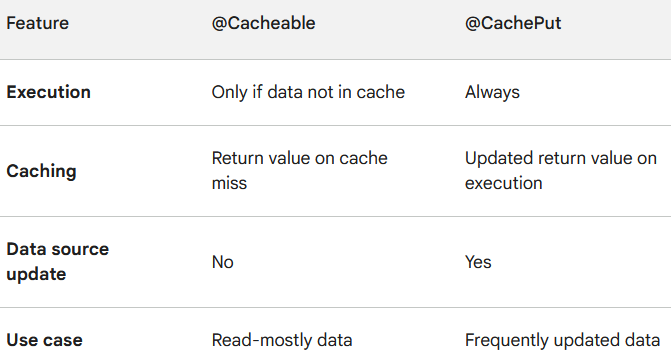
* **@Cacheable:**
This annotation is used at the method level to indicate that the result of invoking a method can be cached. When this annotation is applied, Spring first checks whether the method has been called with the same arguments before. If it has, then the cached result is returned instead of invoking the method again. If annotation is parameterize with the name of the cache, the results would be stored with that name. The getName() internal call will first check the cache name before actually invoking the method and then caching the result.
```java
@SneakyThrows
@Cacheable("products")
public List retrieveAllProducts() {
// Adding a delay assuming some data retrieval operation
log.info("Retrieving all the products");
Thread.sleep(5000);
// Returning a list containing all the products
return Arrays.asList(
new Product(1, "box", "furniture", 1, Boolean.TRUE),
new Product(2, "apple", "food", 10, Boolean.TRUE),
new Product(3, "chair", "furniture", 12, Boolean.TRUE)
);
}
```
{% hint style="info" %}
Note that in most cases, only one cache is declared, the annotation allows multiple names so that more than one cache can be used. In this case, each of the caches is checked before invoking the method. If at least one cache is hit, the associated value is returned.
```java
@Cacheable({"products", "allProducts"})
```
{% endhint %}
{% hint style="info" %}
The cacheNames attribute is used to specify the name of the cache while value specifies the alias for the cacheNames. Both are tied to same object.
{% endhint %}
Since caches are essentially key-value stores, each invocation of a cached method needs to be translated into a suitable key for cache access. The default caching abstraction uses a simple `KeyGenerator` based on the following below algorithm. Spring internally uses `hashCode()` and `equals()` for key matching.
* If no parameters are given, return `SimpleKey.EMPTY`.
* If only one parameter is given, return that instance.
* If more than one parameter is given, return a `SimpleKey` that contains all parameters.
In certain scenario, one of the parameter might be helpful to determine the method output but may not be useful by the cache key generator. For example, `availability` parameter below. For such scenario, spring allows us to specify how the key is generated through its `key` attribute. SpEL declarations is allowed.
```java
@SneakyThrows
@Cacheable(cacheNames = "findProduct", key = "#id + '_' + #name")
public Product findProduct(int id, String name, Boolean availability) {
// Add a delay assuming some data retrieval operation
log.info("Finding product...");
Thread.sleep(5000);
// Returning a product
return new Product(id, "box", "furniture", 1, Boolean.TRUE);
}
```
{% hint style="info" %}
We can define a custom keyGenerator on the operation if needed.
{% endhint %}
Conditional attributes can also be provided in the annotation with a SpEL expression that is evaluated to either true or false. If true, the method is cached else it behaves as if the method is not cached.
```java
@Cacheable(value="productById", condition="#id == 1")
public Product retrieveProductById(int id) {
//...some logic...
}
```
Caching can be controlled based on the output of the method rather than the input via the unless parameter. Unlike `condition`, `unless` expressions are evaluated after the method has been invoked. Example below will never returned cached response as output contains matched "box" value.
```java
@SneakyThrows
@Cacheable(value="productById", unless="#result.name.equals('box')")
public Product retrieveProductById(int id) {
// Add a delay assuming some data retrieval operation
log.info("Retrieving product by id - {}", id);
Thread.sleep(5000);
// Returning a product
return new Product(id, "box", "furniture", 21, Boolean.TRUE);
}
```
The default cache resolution fits well for applications that work with a single CacheManager and have no complex cache resolution requirements. For applications that work with several cache managers, we need to set the cacheManager to use for each operation.
@Cacheable(cacheNames="productById", cacheManager="anotherCacheManager")
public Product retrieveProductById(int id) {
    //...some logic...
}
**Synchronized Caching**
In a multi-threaded environment, certain operations might be concurrently invoked for the same argument. By default, the cache abstraction does not lock anything, and the same value may be computed several times, defeating the purpose of caching.
For those particular cases, we can use the sync attribute to instruct the underlying cache provider to lock the cache entry while the value is being computed. As a result, only one thread is busy computing the value, while the others are blocked until the entry is updated in the cache.
@Cacheable(cacheNames="productById", sync=true)
public Product retrieveProductById(int id) {
    //...some logic...
}
**Caching with** `CompletableFuture` **Return Type**
For a method returning a CompletableFuture, the object produced by that future will be cached whenever it is complete, and the cache lookup for a cache hit will be retrieved via a CompletableFuture.
For example, when`retrieveProductById(int id)` method is called, Spring will execute the method. Once the `CompletableFuture` is completed (i.e., the product is retrieved), Spring caches the result under the key corresponding to the method's parameters (in this case, the `id`). If another request with the same `id` comes in while the `CompletableFuture` is still running, Spring will not block the thread waiting for the result. Instead, it will return the same `CompletableFuture`, and when the result is available, it will be automatically cached for future requests. Subsequent calls with the same `id` will return a completed `CompletableFuture` from the cache, avoiding the need to execute the method again.
```java
@Cacheable("productById")
public CompletableFuture retrieveProductById(int id) {
//...some logic...
}
```
**Caching with** `Reactor Mono` **Return Type**
When a method returns a Reactor Mono, which is a Reactive Streams publisher, the result it emits will be cached once it's available. When there's a cache hit, the cached value will be retrieved as a Mono. This Mono is backed by a CompletableFuture, enabling asynchronous retrieval of cached values, ensuring efficient handling of cached results.
```java
@Cacheable("productById")
public Mono retrieveProductById(int id) {
//...some logic...
}
```
**Caching with** `Reactor Flux` **Return Type**
When a method returns a Reactor Flux, which emits multiple objects through a Reactive Streams publisher, those emitted objects will be gathered into a List and cached once the Flux completes. When there's a cache hit, the cached List value will be retrieved as a Flux. This Flux is backed by a CompletableFuture, enabling asynchronous retrieval of the cached List value, ensuring efficient handling of cached results.
```java
@Cacheable("productById")
public Flux retrieveProductById(int id) {
//...some logic...
}
```
* **@CachePut:**
This annotation is used at the method level to indicate that the result of invoking a method should be cached, regardless of whether the method has been called with the same arguments before. It is typically used for caching the result of an update operation.
Let's understand with an practical example.
**Scenario 1**: Below code caches the result of `retrieveAllProducts`, but updating the product list requires manually invalidating the cache. This can lead to stale data if updates happen outside this method.
```java
@Cacheable("products")
public List retrieveAllProducts() {
// Some data retrieval operation
// Returning a list containing all the products
}
```
**Scenario 2**: With the use of `CachePut`, it always execute the update logic, ensuring data consistency even if updates happen outside this method. Also, it Automatically update the cache with the latest product list, including potential changes to the list. No need for manual cache invalidation, as any update triggers a cache refresh.
```java
@Cacheable("products")
public List retrieveAllProducts() {
// Some data retrieval operation
// Returning a list containing all the products
}
```
```java
@CachePut("updateAndCacheProducts")
public List updateAndCacheProducts(List updatedProducts) {
// Update product based on some logic
// Store updated product information into the datasource
// Return the updated list
}
```
* **@CacheEvict:**
This annotation is used at the method level to indicate that the cached entries associated with the method (or all entries in the cache) should be removed. It is typically used for cache eviction, such as when data is updated or deleted.
```java
@Component
@Slf4j
public class CacheEvictionScheduler {
@CacheEvict(cacheNames = "products", allEntries = true)
@Scheduled(cron = "${cache.products.evict}")
public void evictProductsCache() {
log.info("Clearing cache of products");
}
}
```
{% hint style="info" %}
All entries can be evicted rather than one entry based on the key by setting allEntries field to true.
{% endhint %}
* **@CacheConfig:**
This annotation is used at the **class** level to provide a common cache configuration for all cache-related operations within that class. It allows to specify default cache names, key generators, and other settings.
```java
@CacheConfig("products")
public class ProductRepositoryImpl implements ProductRepository {
@Cacheable
public List retrieveAllProducts() {
// Some data retrieval operation
// Returning a list containing all the products
}
}
```
* **@Caching:**
It is not allowed to use multiple annotations of same type on a given method. So this annotation can be used which allows multiple nested caching annotations on the same method.
```java
@Caching(cacheable = {
@Cacheable(value = "productById", key = "#id"),
@Cacheable(value = "productByName", key = "#name")
}
)
public Product getProductByIdOrName(int id, String name) {
// Some database retrieval logic
// Return product
}
```
---
# Agent Instructions
This documentation is published with GitBook. GitBook is the documentation platform designed so that both humans and AI agents can read, navigate, and reason over technical content effectively. Learn more at gitbook.com.
## Querying This Documentation
If you need additional information that is not directly available in this page, you can query the documentation dynamically by asking a question.
Perform an HTTP GET request on the current page URL with the `ask` query parameter, and the optional `goal` query parameter:
```
GET https://www.pranaypourkar.co.in/the-programmers-guide/spring/spring-features/spring-caching/in-memory-caching.md?ask=&goal=
```
`ask` is the immediate question: it should be specific, self-contained, and written in natural language.
`goal` is optional and describes the broader end goal you are ultimately trying to accomplish on behalf of the user. GitBook uses it to tailor the answer towards what is most useful for that goal.
The response will contain a direct answer to the question and relevant excerpts and sources from the documentation.
Use this mechanism when the answer is not explicitly present in the current page, you need clarification or additional context, or you want to retrieve related documentation sections.