> For the complete documentation index, see [llms.txt](https://www.pranaypourkar.co.in/the-programmers-guide/llms.txt). Markdown versions of documentation pages are available by appending `.md` to page URLs; this page is available as [Markdown](https://www.pranaypourkar.co.in/the-programmers-guide/spring/spring-features/spring-caching.md).
# Spring Caching
Provides details about caching and various methods available along with code examples.
### Introduction to Caching
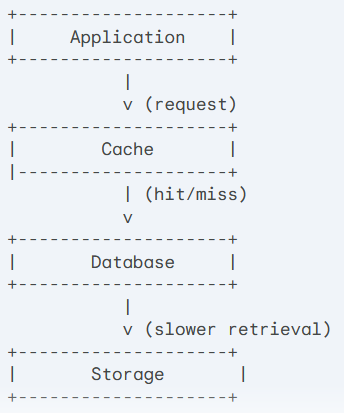
A cache is like a quick-access storage area located between an application and a database or another app. It keeps data that's often used so that when you need it again, it's readily available, making things faster because it doesn't have to fetch the data from the slower main storage every time.
### Types of Caching
**In-Memory Caching**: This type of caching stores data in the application's memory, making it the fastest option but also the most volatile. It's ideal for data that is frequently accessed and rarely updated. Spring Boot supports various in-memory caching providers like EhCache, Caffeine, and Redis.
**Disk Caching**: It involves storing frequently accessed data on a disk, often in the form of files or database tables. It provides a larger storage capacity compared to memory caching but with slower access times.
**Database Caching**: This type of caching stores data in the database itself, offering persistence but slightly slower access times compared to in-memory caching. It's suitable for data that is frequently accessed but also occasionally updated. Spring Boot can leverage database-specific caching features or dedicated database caching solutions. Caching with Couchbase Database is commonly used in various applications, especially those that require fast data access and low latency.
**Content Delivery Network (CDN) Caching**: This type of caching stores data on a Content Delivery Network (CDN) servers geographically distributed around the world. It's ideal for delivering static content like images, videos, and JavaScript files to users with minimal latency. Spring Boot can integrate with CDNs like Amazon CloudFront or Cloudflare.
**Web Caching**: This type of caching stores data on the web server, reducing the load on the application server and improving web page loading times. Spring Boot can integrate with web servers like Apache Tomcat or Nginx to leverage their caching capabilities.
---
# Agent Instructions
This documentation is published with GitBook. GitBook is the documentation platform designed so that both humans and AI agents can read, navigate, and reason over technical content effectively. Learn more at gitbook.com.
## Querying This Documentation
If you need additional information that is not directly available in this page, you can query the documentation dynamically by asking a question.
Perform an HTTP GET request on the current page URL with the `ask` query parameter, and the optional `goal` query parameter:
```
GET https://www.pranaypourkar.co.in/the-programmers-guide/spring/spring-features/spring-caching.md?ask=&goal=
```
`ask` is the immediate question: it should be specific, self-contained, and written in natural language.
`goal` is optional and describes the broader end goal you are ultimately trying to accomplish on behalf of the user. GitBook uses it to tailor the answer towards what is most useful for that goal.
The response will contain a direct answer to the question and relevant excerpts and sources from the documentation.
Use this mechanism when the answer is not explicitly present in the current page, you need clarification or additional context, or you want to retrieve related documentation sections.