> For the complete documentation index, see [llms.txt](https://www.pranaypourkar.co.in/the-programmers-guide/llms.txt). Markdown versions of documentation pages are available by appending `.md` to page URLs; this page is available as [Markdown](https://www.pranaypourkar.co.in/the-programmers-guide/database/platform-specific-features/oracle/query-processing-and-execution/order-of-execution-of-the-query.md).
# Order of Execution of the query
The order of execution of a SQL query can vary depending on the specific database management system (DBMS) being used and the query optimizer's implementation.
## SELECT statement execution order
### Description
The order of execution for a SQL query in Oracle, specifically a SELECT statement, follows a well-defined sequence:
#### **1 - FROM Clause:**
The database engine first identifies the tables involved in the query based on the `FROM` clause. This includes resolving table names, aliases, and joins (if present).
#### **2 - WHERE Clause (Filtering):**
Once the tables are identified, the WHERE clause comes into play. Rows that do not meet the specified conditions in the WHERE clause are filtered out. This filtering happens before any aggregations or ordering.
#### **3 - JOINs:**
If the query involves joins between tables, the join operation is performed after WHERE clause filtering. The join operation combines rows from multiple tables based on the join condition.
#### **4 - GROUP BY (Grouping):**
After filtering and joining (if applicable), the GROUP BY clause, if present, groups the remaining rows based on the specified columns. This creates groups of rows with identical values in the group by columns.
#### **5 - HAVING Clause (Group Filtering):**
The HAVING clause, if present, is applied after grouping. It filters the groups created by the GROUP BY clause based on a condition applied to aggregate functions (e.g., only groups with a total order count greater than 5).
#### **6 - SELECT Clause (Projection):**
The SELECT clause determines which columns or expressions are retrieved for each row.
#### **7 - ORDER BY (Sorting):**
Finally, the ORDER BY clause, if present, sorts the result set based on the specified columns in ascending (ASC) or descending (DESC) order. This is the last step before the results are returned.
### Example
```
SELECT LAST_NAME, FIRST_NAME FROM EMPLOYEE WHERE DEPARTMENT = 'IT';
```
```
SELECT LAST_NAME, FIRST_NAME
FROM EMPLOYEE
WHERE DEPARTMENT = 'IT'
ORDER BY FIRST_NAME;
```
```
SELECT DEPARTMENT, COUNT(*)
FROM EMPLOYEES
WHERE SALARY > 80000
GROUP BY DEPARTMENT
ORDER BY COUNT(*) DESC;
```
```
SELECT DEPARTMENT
FROM EMPLOYEES
WHERE DEPARTMENT <> 'SALES'
GROUP BY DEPARTMENT
HAVING AVG(SALARY) > 80000;
```
```
SELECT EMPLOYEE_ID, LAST_NAME
FROM EMPLOYEES
JOIN DEPARTMENT
ON DEPARTMENT = DEPT_NAME
WHERE BUDGET > 275000;
```
## Rownum execution order
### Description
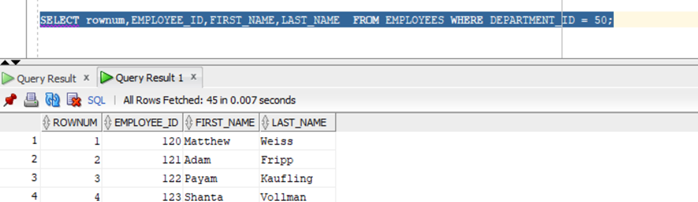
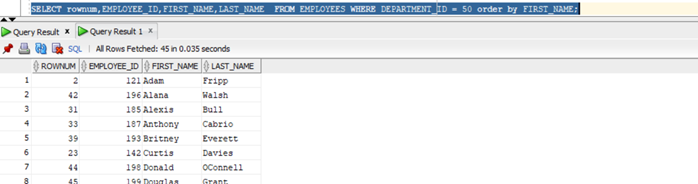
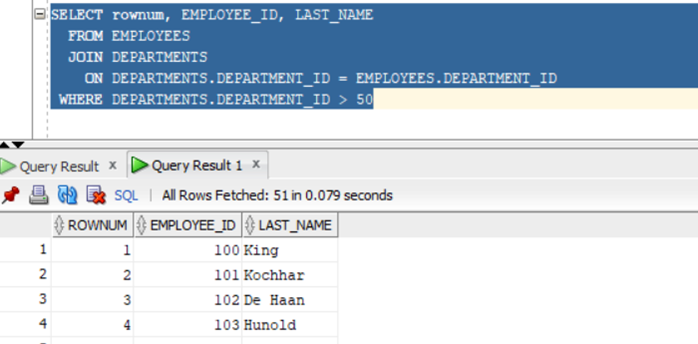
In Oracle, the `ROWNUM` pseudocolumn is evaluated after all other clauses in the `SELECT` statement **except for the `WHERE` clause**. This means:
1. **`FROM` Clause:** Identify tables involved.
2. **`WHERE` Clause:** Filter rows based on conditions.
3. **Joins (if applicable):** Combine rows from multiple tables.
4. **`ROWNUM` Assignment:** Assign a unique `ROWNUM` to each remaining row in the order they appear after the `WHERE` clause.
5. **`ORDER BY` Clause (if applicable):** Sort the result set based on specified columns.
6. **`SELECT` Clause:** Project the desired columns or expressions.
### Example
```
SELECT rownum,EMPLOYEE_ID,FIRST_NAME,LAST_NAME FROM EMPLOYEES
WHERE DEPARTMENT_ID = 50;
```
```
SELECT rownum,EMPLOYEE_ID,FIRST_NAME,LAST_NAME FROM EMPLOYEES
WHERE DEPARTMENT_ID = 50 order by FIRST_NAME;
```
```
SELECT rownum, EMPLOYEE_ID, LAST_NAME
FROM EMPLOYEES
JOIN DEPARTMENTS
ON DEPARTMENTS.DEPARTMENT_ID = EMPLOYEES.DEPARTMENT_ID
WHERE DEPARTMENTS.DEPARTMENT_ID > 50;
```
---
# Agent Instructions
This documentation is published with GitBook. GitBook is the documentation platform designed so that both humans and AI agents can read, navigate, and reason over technical content effectively. Learn more at gitbook.com.
## Querying This Documentation
If you need additional information that is not directly available in this page, you can query the documentation dynamically by asking a question.
Perform an HTTP GET request on the current page URL with the `ask` query parameter, and the optional `goal` query parameter:
```
GET https://www.pranaypourkar.co.in/the-programmers-guide/database/platform-specific-features/oracle/query-processing-and-execution/order-of-execution-of-the-query.md?ask=&goal=
```
`ask` is the immediate question: it should be specific, self-contained, and written in natural language.
`goal` is optional and describes the broader end goal you are ultimately trying to accomplish on behalf of the user. GitBook uses it to tailor the answer towards what is most useful for that goal.
The response will contain a direct answer to the question and relevant excerpts and sources from the documentation.
Use this mechanism when the answer is not explicitly present in the current page, you need clarification or additional context, or you want to retrieve related documentation sections.